BackHow to: Use the Placements tool for T levels

Want to show the video above when you're not signed into Unifrog? Here's the link.
Here is how to use the Unifrog Placements tool for T levels.
HELPING STUDENTS LEARN ABOUT T LEVELS
Firstly, we help students who are considering T levels get clued up about them. Here are the four main things, and at the bottom of this guide we list more resources from the platform):
- Guide for students: T levels: are they the right choice for you?
- Guide for teachers: For teachers: what are T levels and should you offer them?
- Teaching resource: Is a T level right for me?
- Finding T levels: Our College / Sixth Form tool makes it easy for students to find T level courses near them (find a step-by-step guide on how to use the tool here).
USING THE PLACEMENTS TOOL TO ADMINISTER T LEVEL PLACEMENTS
If your school/college offers T levels, our Placements tool is a must: we make the admin behind organising these easy. Here's how:
- Is it a T level?
As a school/college you can choose to have the ‘Is it a T level?’ setting switched on for the Placements tool.
With this setting switched on, when a student in Y12+ adds a placement, they're asked if it’s part of a T level. This means the system can flag it as part of a T level, and it’s treated a little differently to a regular placement - more on this below.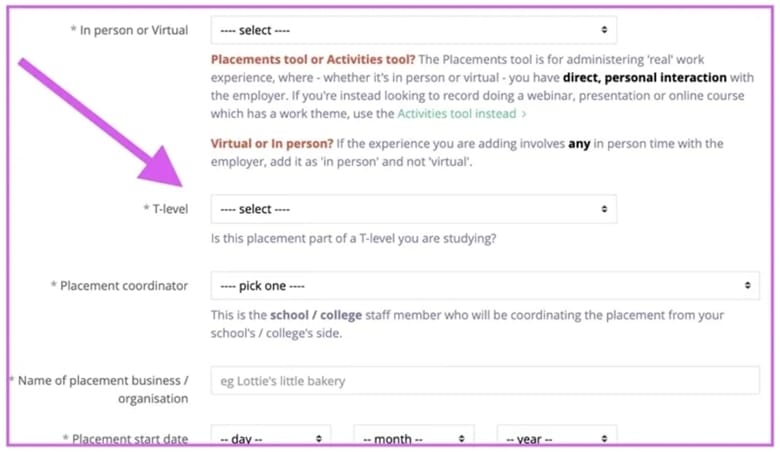
- Student learning objectives
When a student is adding a placement they are asked to add their learning objectives. We give them some guidance on how to come up with some good objectives (covering both professional behaviours and technical skills).
- Learning goals
In the Permission form, the placement coordinator has a field for the Learning goals for the placement. To help set these, coordinators can see what the student has said their learning objectives are, and what the employer has said for the overview of the placement.
Hours and Logbook
The logbook lets students record the hours they’ve done on placements that last more than a week, and lets employers confirm those hours.
Coordinators, students and employers can see how many hours of placement have been recorded so far, how many weeks are missing the student record, and how many weeks are missing the employer confirmation.
Coordinators can switch on the logbook for any in person placement lasting longer than a week - including for placements that aren't part of a T level.
Find out more about the logbook here.All placements (including those that are less than a week) have an ‘Estimated total hours’ field. At the end of a placement, the Estimated total hours are compared to the total Logbook hours to make sure the data is good.
- Check-ins
There are three main things for these:
- Up to five check-ins
Teachers can add up to five check-ins for each placement. This is plenty - normally for T levels you would just need an initial check-in, a mid-point check-in, and a final one at the end.
You can see the button to add a ‘Check-in 2’ at the bottom of a saved ‘Check-in 1’, and the button to add a ‘Check-in 3' at the bottom of a saved ’Check-in 2', etc.
- Drop down ratings
In each check-in coordinators have 3 optional drop downs with which to rate students and the placement itself:- Student's attendance and punctuality
- Student's conduct and attitude
- How much the student is learning
- Check-in learning goals
At the end of each check-in, staff can choose to tweak the learning goals for the placement, using as a starting point the learning goals that were saved in the previous stage of the process, and without changing the learning goals that have previously been saved.
- Up to five check-ins
- Sorting by T levels
On the Advanced view of the Manage page, placement coordinators can choose to only see students who have T level placements added. This makes it easier to manage these placements, and to spot if a T level student is missing a placement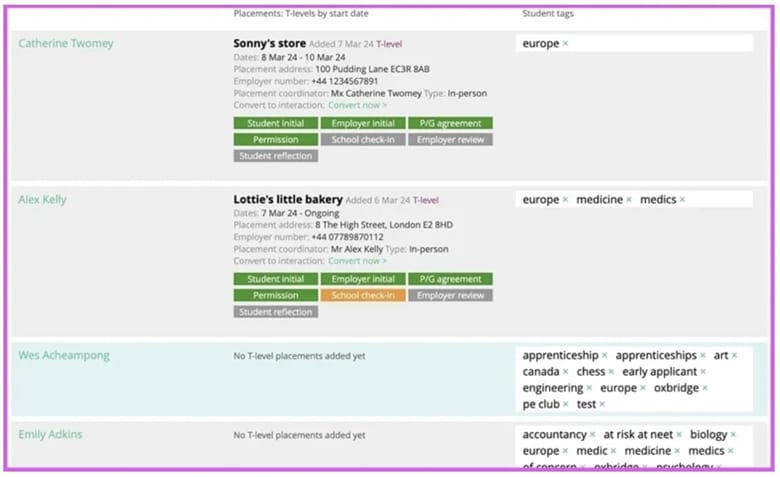
- End point assessments
We’ve included the government’s suggested questions for the T level end point assessment to the Student reflection form, and the Employer feedback form, for example: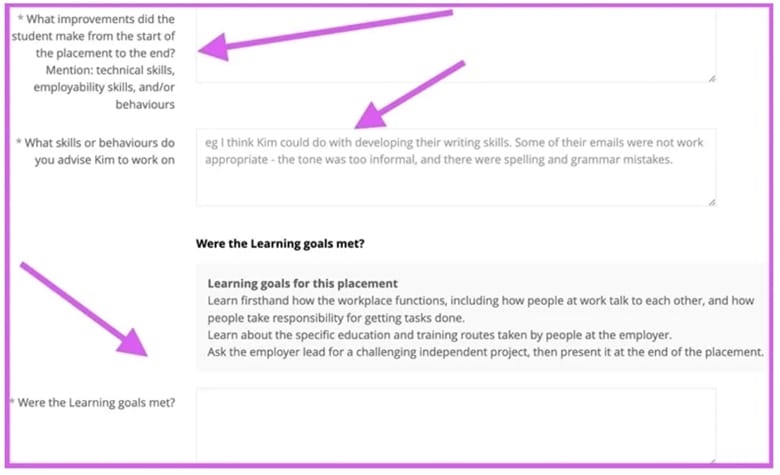
- PDF downloads of the entire placement process
For your record keeping, for a placement you can download all the forms as one easy-to-store PDF.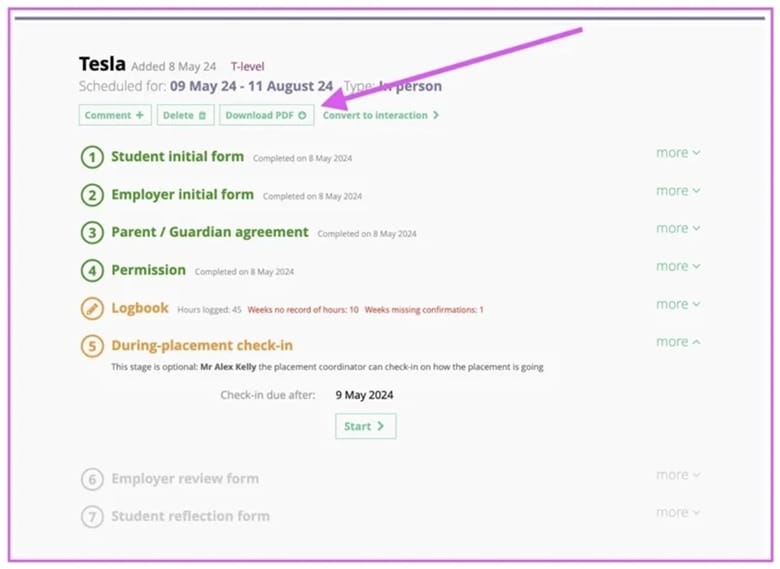


MORE RESOURCES ON UNIFROG TO SUPPORT T LEVELS
For students:
- T levels: how to decide if they're the right choice for you
- College qualifications and levels explained: England
- Choosing your level 3 qualifications
- Applying for UK college with a disability
- UTCs: what are they and how do you get in?
- Higher Technical Qualifications (HTQs): a simple guide
- Is a UK apprenticeship right for me?
For parents:
- Helping your child to make their Level 3 qualification choices (parents will need to sign into their parent accounts to access this link)
For teachers:
- What are T levels and should you offer them?
- Is a T level right for me?
- Post 16 - Choices, choices
- Decision making - choosing your Post 16 pathway
WHAT ABOUT THE GOVERNMENT'S T LEVEL RESOURCES?
The Government has created a ‘Industry placement student logbook', which provides great information and activities for students ahead of, during and after their placements.
It is not compulsory for students to use all or any of this logbook. Some of the activities in the handbook are covered on Unifrog's placements tool, for example:
- Unifrog's Logbook serves the same purpose as the handbook's ‘Student timesheet'
- Unifrog's Student Reflection form serves the same purpose as the handbook's ‘At the end of the placement’
- Unifrog's Employer feedback form serves the same purpose as the handbook's ‘Employer reflections’
Our advice is for you to pick and choose the parts of the government's handbook that you think will be most useful for your students. You can also create your own versions of the government's handbook.