Data & Terms
Data & Terms
Single sign-on (SSO).
SSO allows students and teachers to login to Unifrog via their Google or Microsoft accounts, as well as by using their Unifrog usernames and passwords. It can make logging in much quicker! We do not charge for using our SSO integrations. For more info about setting up SSO, see here
How to enable SSO at your school or college
The teacher who is the lead contact at your school or college (known as the 'Unifrog champion') needs to ask someone at Unifrog to switch it on.
You can see who the Unifrog champion is at your school/college here.
The best way for the teacher champion to contact us is by email, or by sending us a message here.
Technical admin at your institution giving permission
It is often the case that a user with admin permissions for your school / college's Google or Microsoft account needs to grant access for other users at your school / college to login to Unifrog with SSO.
You should find out by speaking to your technical team if this is the case at your institution.
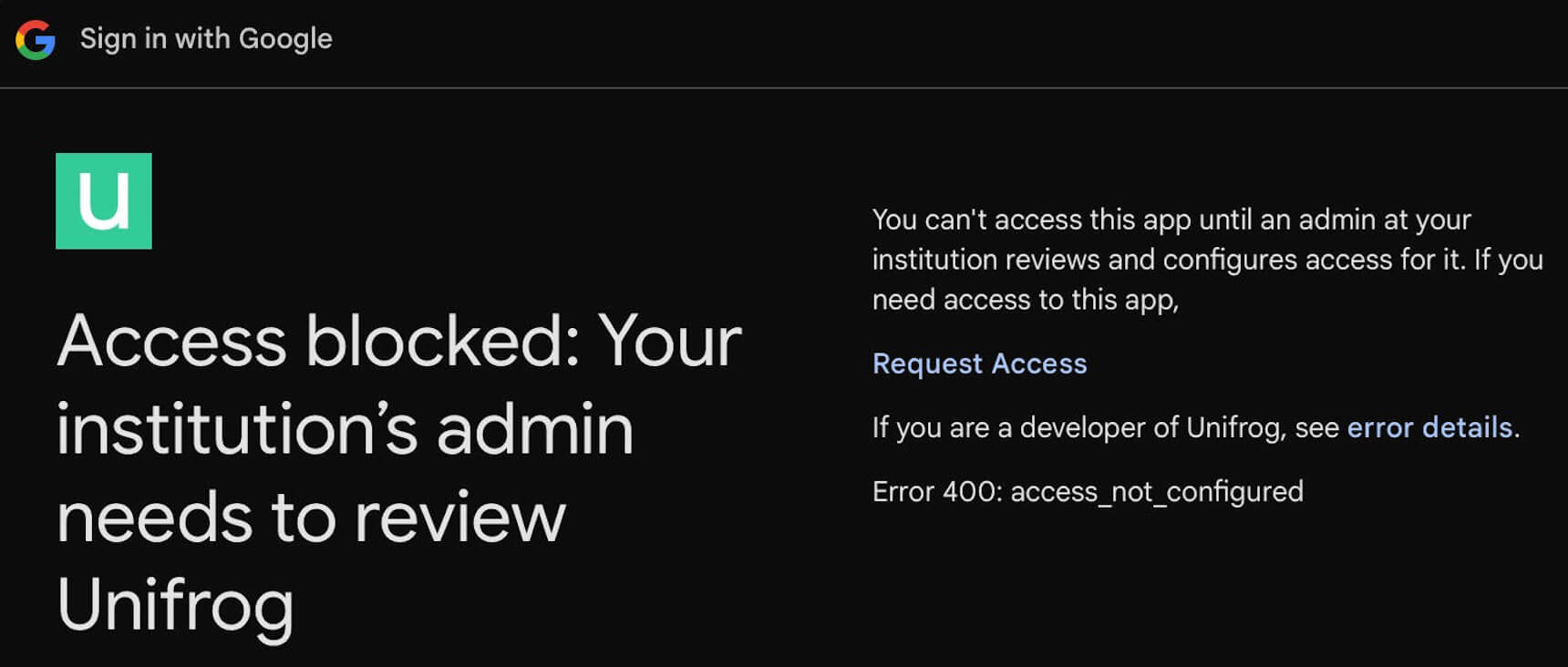
If someone at your school / college tries to login with SSO before the admin has given permission, they'll see an interface like this:
Or this:
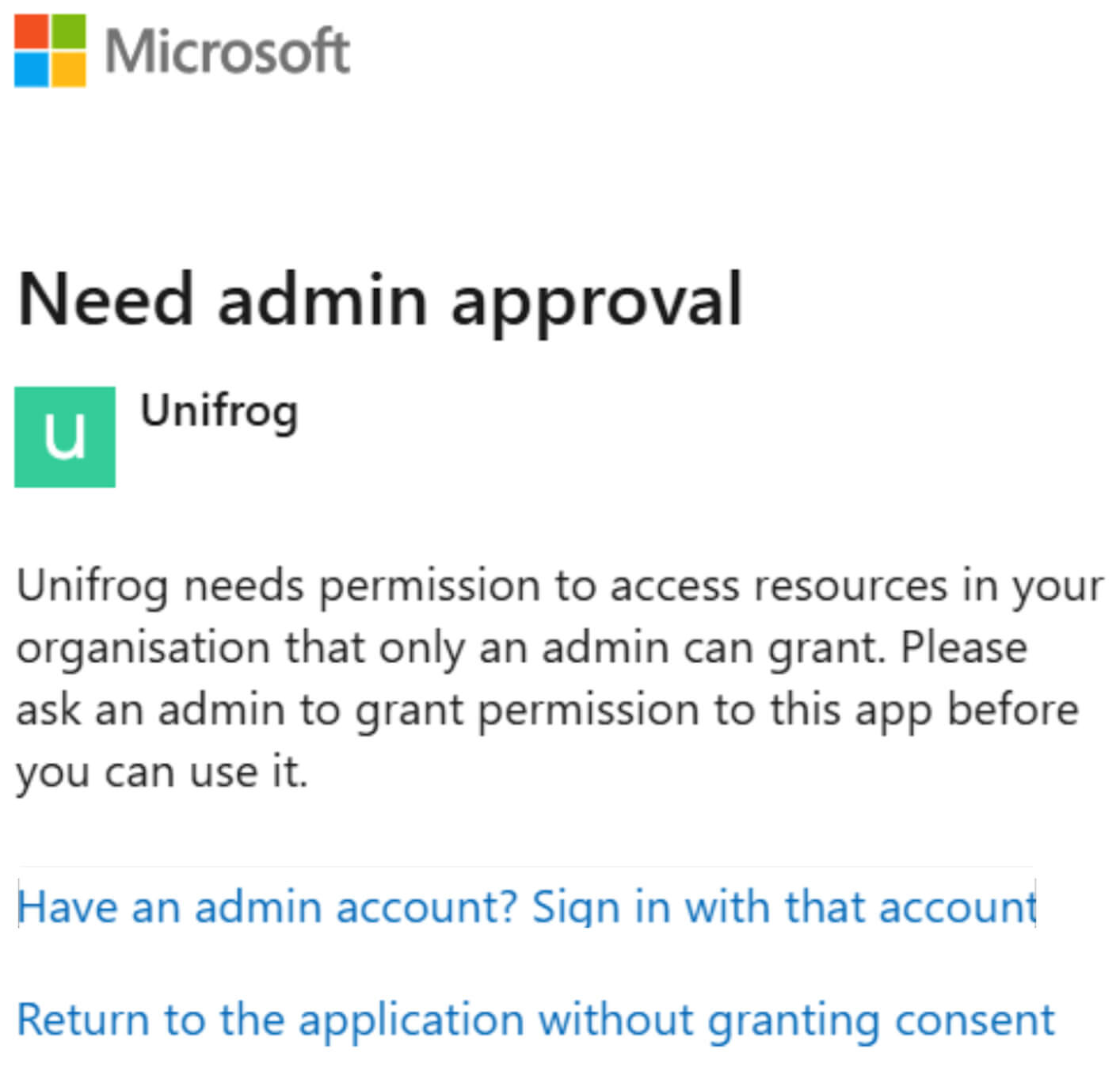
As you can see, these interfaces instruct you to send the admin at your school / college a request to grant permission. We cannot send this request to them for you.
What is a Hosted Domain (Google) and Tenant ID (Microsoft)?
These are IDs for your school's or college's Google or Microsoft account, that we add for your school/college as part of the setup process for SSO.
Adding these makes it so that people with student or teacher accounts are only able to use SSO with official email addresses for your institution. If they use a personal email address they will not be able to use SSO, but they will be able to use the normal username and password login method.
SSO with Microsoft requires a Tenant ID to be added for your school or college.
For SSO to be used with Google it's not essential for us to add your institution's Hosted Domain, but we recommend it as it provides an extra layer of security.
Where do you find your Hosted Domain / Tenant ID?
A member of your technical team will know what your Hosted Domain / Tenant ID is. Normally you will give us this information when we first switch on SSO for your school / college.
Microsoft IDs are a code, eg 'abf988bf-86f1-41af-91ab-2d7cd011db46', while Google Hosted Domains are website domains, eg 'school.com'.
What else is there to know about Hosted Domains / Tenant IDs?
On Unifrog a school can have up to two Hosted Domains; often one is used for student accounts, and another for teacher accounts.
Sometimes, but not always, all the schools / colleges within a single school or college group use the same Hosted Domains / Tenant IDs. Your technical team will know if this is the case for you.
You can choose to have us set up Google SSO without initially giving us your Hosted Domain, and then we can add it later for you. However, Microsoft SSO requires a Tenant ID before users can sign in using Microsoft.
You can see whether you have a Tenant ID or Hosted Domain(s) added for you on your Unifrog setup page.
How do I know if my school / college has SSO switched on?
When SSO has been switched on, all teachers see a pop up on their teacher homepage telling them that SSO is now enabled. Teachers can also see their school / college SSO status here. And - of course - you'll be able to sign in using SSO!
Two-factor authentication
For SSO, two-factor authentication is managed by Google or Microsoft, not by Unifrog, and it tends to be enabled as standard. Separately, for Unifrog's own username and password system, teachers can have two-factor authentication applied. If you already have a Unifrog teacher account you can find our guide about Unifrog's two-factor authentication for the username and password login method here.
Creating new student and teacher accounts after SSO is switched on for your school / college
SSO does not change how new student and teacher accounts are created (this is still either by syncing with your MIS, or on Unifrog manually / by csv upload). However, when new student and teacher accounts are created after SSO is switched on for your school / college, these new students and teachers can choose to login to Unifrog using SSO without ever choosing a Unifrog password. They can pick a Unifrog password later if they wish, meaning they can also login using the username and password method.
Parent accounts and SSO
On Unifrog, parents can have their own dedicated sort of account which lets them: explore the platform like their child can, see opportunities particularly relevant for their child, and join live events for parents - see more here.
To create a parent account:
- First the parent's email address has to be added in the 'Parent / Guardian email address' field on their child's Unifrog profile by the school
- Next the parent opens their own account on this page
Regarding parents and SSO:
- Parent accounts are not tied to particular schools, so the Microsoft Tenant ID or Google Hosted Domain of their child's school is not relevant.
- Parents cannot use SSO with Microsoft, as Microsoft SSO requires a Tenant ID, and parent accounts are not tied to particular schools.
- Parents can use SSO with Google (and they can also use the email and password method).
Problems logging in
If you're a teacher, you can check if your school / college has SSO enabled here.
If a student or teacher is having trouble logging in via SSO, it might be because their Google or Microsoft username is not the same as the one that exists on Unifrog. After you've updated the usernames on Unifrog, they should be able to login fine. Find guides on managing student accounts here, and guides on managing teacher accounts here.
What sorts of devices work with SSO?
SSO works on any device where the user can sign into the Google or Microsoft account that's associated with their Unifrog username.
So, if at your school/college people can only sign into their Google or Microsoft account using a school or college device, you won't be able to use SSO on personal devices. However you'll still be able to sign in via the username and password method (and you can reset your password if you can't remember it, or haven't chosen one yet!)
My school / college is part of group. Can we have SSO switched on in bulk?
Yes you can. You need to ask your Unifrog contact to do this for you. Your Unifrog contact will need to know if you use Google or Microsoft, and what your Hosted Domain(s) / Tenant ID is (including whether this is the same for each member of the group).
What about SAML?
Unifrog's SSO integrations are not customer-configured SAML integrations.
For Google SSO, we use Google Sign-In and can restrict access using your institution's Google Hosted Domain.
For Microsoft SSO, we use Microsoft's identity platform and restrict access using your institution's Tenant ID.
You do not need to provide us with SAML configuration details such as an ACS URL, Entity ID, metadata XML, federation metadata, or similar information.
Do we need to register Unifrog as an app in Microsoft Entra ID?
No, you do not need to register Unifrog as an application in your Microsoft Entra ID environment (previously known as Azure Active Directory, or Azure AD).
Unifrog is a centrally hosted platform, and we manage the Microsoft SSO integration on your behalf. This means there is no need for your IT team to create an App Registration, Enterprise Application, or any other Microsoft Entra ID configuration specifically for Unifrog.
Some other platforms require each school or college to register their own application because they offer self-hosted or customer-managed deployments. Unifrog does not support self-hosting, so this step is not necessary.
A Tenant ID is required for Microsoft SSO. Before users at your school or college can sign in to Unifrog using Microsoft SSO, we must add your Microsoft Entra ID Tenant ID to your Unifrog setup. This restriction helps ensure that only users from your institution's Microsoft account can use Microsoft SSO to access Unifrog. Your technical team will be able to provide your Tenant ID as part of the setup process. If you're unsure what it is or where to find it, we can help point you in the right direction.
Our integration with Wonde.
With our Wonde integration live, student and teacher accounts are created from the information in your MIS. All the necessary permissions are covered in our normal terms. For more info on how the integration works, including the data we request via the integration, see here
How the Wonde integration works
>>> If you have a Unifrog teacher account, find a full guide (including videos) on how to use our integration with Wonde here <<<
THE BASICS ABOUT WONDE
With the Wonde integration live:
- Student and teacher accounts on Unifrog can be created using the information in your MIS
- The information on student and teacher accounts is kept in sync with your MIS – meaning when something changes on your MIS, it can be quickly updated in Unifrog.
The information flows from your MIS to Wonde, and then into Unifrog. There is no way for information to flow back from Unifrog to your MIS.
IS USING WONDE COVERED BY UNIFROG'S TERMS?
Yes. Unifrog's existing Privacy Policy covers all the data that is held on Unifrog (whether it comes through Wonde or not), and what it is used for. At the bottom of this guide you can see all the data fields included in the integration, and what they are used for.
GETTING STARTED
To use Wonde, you first need to have it installed in your MIS. Check with your IT team if this is already the case at your school/college. If it isn't, you'll need to arrange the installation with Wonde, separate to us.
After you have decided that you'd like to use the integration, the Unifrog team needs to have your school / college added to our Wonde dashboard. If you'd like this to happen - please contact us! We charge a small annual admin fee.
REQUIRED VS OPTIONAL DATA FIELDS
The way Wonde works is that we must request the same set of data for every school / college. Individual schools can choose not to provide data fields that we mark as ‘Optional’.
Schools store on their MIS the core information we absolutely need in order for Unifrog to function (eg the name of form groups, and the email address of form tutors) in different ways, so for all schools we have to request as required all of the fields that any school uses for the core set of information that we need.
We only mark as ‘Required’ the data fields that are necessary for Unifrog to function at a school. Where we don’t absolutely need information in order for Unifrog to work, we mark the data field as ‘Optional’.
The data fields marked as ‘Optional’ allow schools and students to have more functionality on Unifrog – for example:
- Allowing schools to analyse how students with different characteristics use Unifrog, and what sort of destinations they end up in after leaving your school.
- Allowing Unifrog to flag to students special opportunities like work experience and scholarships that are particular to students with their characteristics.
You can see full detail on all the data we collect on users and why we collect it, in our Privacy Policy here.
PREPARING FOR YOUR FIRST SYNC
To prepare for your first sync, on your school’s/college’s Wonde dashboard your IT team can toggle the optional fields on or off at the point at which it receives the invitation to include Unifrog in the Wonde integration.
You can change your mind about the optional fields at any point. Below we explain which fields are included in Wonde, which ones are optional, and what all the fields are used for on Unifrog.
ALL THE DATA WE REQUEST
Employees
Allows us to create teacher accounts.
We need all teaching staff, and not only staff marked as ‘teaching staff’, because sometimes non-teaching staff need access to the platform (for example they might be an adviser but not a teacher), and because sometimes schools mistakenly mark teaching staff as not teaching staff.
We only sync staff that should have access to Unifrog – and on the Wonde interface on Unifrog you have full visibility of who that is.
Employees upi |
Required |
Unique wonde identifier |
Employees title |
Required |
E.g. ‘Ms’ |
Employees initials |
Required |
E.g. ‘KA’ |
Employees surname |
Required |
E.g. ‘Anderson’ |
Employees forename |
Required |
E.g. ‘Kim’ |
Employees legal surname |
Optional |
E.g. ‘Anderson’ |
Employees legal forename |
Optional |
E.g. ‘Kim’ |
Employees email |
Required |
E.g. ‘kim@gmail.com’ |
Employees teaching staff |
Required |
Is the employee a teacher |
Employees current |
Required |
Is the employee currently employed |
Employees role text |
Required |
The employee’s role, e.g. ‘Teacher’ |
Classes, Subjects and Groups
Allows us to create Forms (note that you still need to create and update subject Classes directly on Unifrog or via csv upload).
Classes name |
Required |
E.g. ‘10A’. Commonly used for form names |
Classes description |
Required |
E.g. ‘10A’. Sometimes used for form names |
Classes subject |
Required |
E.g. ‘Art’ |
Classes code |
Required |
E.g. ‘Ar’. Commonly used as an internal code for a class name |
Subjects name |
Required |
E.g. ‘Art’ |
Subjects code |
Required |
E.g. ‘Ar’. Commonly used as an internal code for a class name |
Subjects active |
Required |
Shows if the class is active. |
Groups name |
Required |
E.g. ‘10A’. Commonly used for form names |
Groups code |
Required |
E.g. ‘10A’. Sometimes used for form name |
Groups type |
Required |
Sometimes defines if it’s a form name or a class name |
Groups description |
Required |
Sometimes defines if it’s a form name or a class name |
Groups notes |
Required |
Sometimes defines if it’s a form name or a class name |
Students
Allows us to create student accounts, add students’ characteristics, and assign students to the correct forms, form teachers, and counselors.
Students upi |
Required |
Unique Wonde identifier |
Students initials |
Required |
E.g. ‘GS’ |
Students surname |
Required |
E.g. ‘Smith’ |
Students forename |
Required |
E.g. ‘George’ |
Students middle names |
Required |
E.g. ‘Michael’ |
Students legal surname |
Optional |
E.g. ‘Smith’. |
Students legal forename |
Optional |
E.g. ‘Michael’ |
Students gender |
Optional |
E.g. ‘Male’ |
Students date of birth |
Optional |
Allows Unifrog to suggest opportunities to the students specific to their age. Affects how some parts of Unifrog work for students – for example, the Placements tool can work differently for students who are 18+. |
Students email |
Required |
E.g. ‘student@schoolname.com’ |
Students postcode |
Optional |
A student’s postcode is used to show them their distance from different opportunities (e.g. university courses and apprenticeships), as well as to flag special opportunities to them that are relevant to where they live. |
Students current nc year |
Required |
Used for year group / grade. |
Students leaving date |
Required |
Shows if a student is now an alumnus. |
Students SEN |
Optional |
Allows schools to analyse how Unifrog is used by different sorts of students. Allows Unifrog to suggest opportunities to students specific to their characteristics, for example scholarships and work experience. |
Students premium pupil indicator |
Optional |
Students service children |
Optional |
Students ever in care |
Optional |
Students premium pupil eligible |
Optional |
Students ethnicity |
Optional |
Students English as additional language |
Optional |
Students ethnicity code |
Optional |
Students nationality |
Optional |
Students English as additional language status |
Optional |
Students UPN |
Optional |
Allows schools to more easily upload data from Unifrog into other systems, for example into the school’s MIS, and to Compass+. |
Students user defined fields |
Optional |
Used for various purposes, for example it can be where a school stores information on students’ forms, form teachers, or counselors. |
WONDE AND STUDENT CHARACTERISTICS
We can potentially bring through these student characteristics via Wonde:
- Care (are they a Looked After Child)
- Service (is one of their parents in the armed services)
- EAL (do they speak English as an Additional Language)
- PP (are they Pupil Premium)
- SEN (do they have Special Educational Needs or Difficulties)
- Ethnicity
- Nationality (what passports they have)
All the characteristics are optional fields. If they are brought through via the integration, any data entered in a category for a student will be synced (i.e. updated/overwritten) with Wonde data each time the student is synced.
None of the other characteristics that can be added for a student in Unifrog (eg if they are a Persistent Absentee) are affected by Wonde at all.
THE MISs THAT WONDE SUPPORTS
Here are the MISs that Wonde supports. At the moment we do not support integration with any others, and do not have a timeline on when this will change.
Arbor |
Bromcom |
Databridge |
Engage |
ET-AIMS |
Facility |
Integris |
iSAMS |
Cloud School |
PupilAsset |
ScholarPack REST |
SIMS |
SIMS Primary |
Teacher Centre |
WCBS |
WCBS Hub |
SchoolBase |
SchoolPod |
XP Trust |
Compass UK |
Engage API |
Synergetic |
TASS |
SchoolPro |
SchoolEdge/SAS2000 |
FACTS (PCSchool) |
Civica - CES (SIF) |
Sentral |
Sentral LISS |
NSW 3PI (SIF) |
Classe 365 |
Educonnex |
Edumate |
Edumate API |
Civica - MAZE |
DayMap |
ICON (SIF) |
SIMON |
Xuno |
Zunia |
Edval |
Timetabling Solutions |
EDSAS |
VSware |
Aladdin |
Kamar |
LINC Tech/Hero |
MUSAC/Edge API |
Ed-admin |
ADAM |
Edupac |
Veracross |
Where does Unifrog's data come from?
Lots of places. This includes UCAS, the National Apprenticeships Service, The National Careers Service, Unistats, HESA, The Guardian, HEPI, the Cabinet Office, the Office for National Statistics, the Commission for Employment and Skills, the Department for Business Innovation and Skills, Ofsted, every UK university, UK university alumni, FutureLearn, Coursera, Udacity, every college at Oxford and Cambridge, and QS. We keep all our data bang up to date - for example, apprenticeships vacancies are updated every night.
Lost data.
We keep complete version histories of students' essays and teachers' references and letters of recommendation. If you delete students by accident we can get them back again in full as long as you alert us within a month. If you delete students by accident and then alert us after a month, the data we can restore about them might not be complete, and we will charge you for the cost of the data recovery.
Website terms.
You can read our website terms here.
Data Protection Impact Assessment (DPIA).
We have prepared a data protection impact assessment (DPIA) that is an adaptation of the template produced by the Information Commissioner's Office (ICO). Read it here.
Privacy policy.
We are committed to processing, storing and using personal data fairly and lawfully in accordance with the General Data Protection Regulation (GDPR) 2018. Unifrog is registered with the Information Commissioner. Read our Privacy Policy here.
Student Privacy Notice.
In line with the Children's Code, when they access the platform we show students a version of our Privacy Policy designed to make it easier for them to understand how we process their data. Read it here.
General Data Protection Regulation (GDPR) 2018.
We take great care for our work to be fully compliant with the GDPR. Here are our answers to some common GDPR related questions
GDPR FAQs
Unifrog takes its data protection responsibilities seriously. In relation to the Unifrog Website, both we and our partner institutions are treated as data controllers under the GDPR (now incorporated into UK law and known as "the UK GDPR". When we refer to the GDPR in these FAQs, we mean the UK GDPR).
Everything is covered in our Service terms and Privacy Policy, but we’ve set out answers to the most common queries we receive from partner institutions relating to data protection below.
a. Where is our contract with Unifrog?
Our Service terms govern our relationship with partner schools and colleges.
These Service terms also refer to:
- our Privacy Policy, which sets out how we process personal information; and
- our Website terms, which sets out the rules that apply when using the Unifrog Website.
b. Don't we need a signed Data Processing Agreement (DPA) to give personal data to you?
No. As detailed in section 15.2 of our Service terms, both Unifrog and the partner institution are acting as data controllers in respect of the relevant personal data, meaning that a Data Processing Agreement is not appropriate. (Please see Why is Unifrog treated as a controller and not a processor? below).
c. Why is Unifrog treated as a controller and not a processor?
We (Unifrog) act as a controller in relation to student, teacher and other staff data which we process (or use) in connection with the Unifrog Website because we determine how and why we process that data, rather than simply processing it as directed by our partner institutions. This is in line with the definition of controller in the GDPR.
For example, we decide what personal data to collect, the purpose and lawful basis for collecting and using that data, and how long to keep it. We make these decisions independently, without taking instructions from our partner institutions. This is necessary so that we can operate the Unifrog Website effectively. Being a controller also means we have a higher level of compliance responsibility under the GDPR.
d. Are Unifrog and the partner institution “joint controllers”?
No. Not all controllers are “joint controllers” (within the meaning of the GDPR), even if they work with other controllers to determine how and why certain data should be processed. Joint controllers work together to “jointly decide the purpose and manner of processing”. Other types of controllers independently decide the purpose and manner of processing, even when sharing data, and often use the data for different purposes. This is an important distinction since the GDPR only requires agreements between joint controllers (and between controllers and processors).
Unifrog and the institution are acting as independent controllers rather than joint controllers. In brief, this is because Unifrog determines what data it collects from students and teachers on its own, rather than in collaboration with any particular institution. Unifrog has also independently designed the Unifrog Website, and the processing involved as part of its operation.
e. We're a partner institution located in the European Economic Area (EEA) or a third country with the benefit of a UK adequacy regulation. Do you have a copy of our signed Data Sharing Agreement (DSA)?
Section 15 of our Service terms sets out the data sharing agreement that we have in place with our partner institutions in the EEA and other countries where the UK government is satisfied that there is an adequate level of data protection without the need for implementing additional safeguards (known in the UK as an adequacy regulation). Each institution agrees to these Terms of Service digitally during our onboarding process.
f. Aren’t we required by the GDPR to have a signed Data Sharing Agreement (DSA)?
No. In fact, there is no requirement under the GDPR to put in place any data sharing agreement in these circumstances (please see Are Unifrog and the partner institution “joint controllers” above). However, we cover data sharing in our Service terms in order to protect the data that we, and the partner institution, process. Since we ask each institution to agree to our Service terms as part of our onboarding process, there is no need for a separate signed copy. We can however send you a PDF of our Service terms for your records.
g. We're a partner institution in a country outside the EEA without the benefit of an UK adequacy regulation. Do we need to sign a DSA?
Yes. The GDPR prohibits the transfer of personal data to such countries unless appropriate safeguards are implemented to bring the level of protection to that required under UK law. With that in mind, the DSA incorporates Standard Contractual Clauses (SCCs). The DSA also includes a data transfer impact assessment, which is required where SCCs are used, to legitimise restricted cross-border transfers.
You will agree to the DSA at the same time as you agree to our other terms, during the onboarding process at the beginning of your school’s Unifrog subscription.
h. We're a partner institution located in the European Economic Area (EEA). Do we need to enter into Standard Contractual Clauses (SCCs) or adopt other safeguards for our transfers of personal data to Unifrog?
No. The European Commission has adopted an adequacy decision for the UK under the GDPR. This means transfers of personal data from the EEA to the UK can continue without the need for further safeguards, such as SCCs. Data transfers from the UK to the EEA can also continue to flow freely, since the UK recognises EEA member states as providing an adequate level of protection of personal data.
i. What personal data is processed by, and shared between, Unifrog and the partner institution?
Clause 15.2 of our Service terms sets out the types of data that we and our partner institutions process and share with each other in relation to the Unifrog platform, and the categories of data subjects.
Our Privacy Policy, including the sections headed “INFORMATION WE COLLECT (INCLUDING WHEN AND HOW WE COLLECT IT)” and “SHARING / ENABLING OTHERS TO PROCESS YOUR INFORMATION”, provides full details of our processing.
j. When processing special category data, what GDPR conditions do Unifrog and the partner institution rely on?
Clause 15.8 of our Service terms states that Unifrog and the partner institution rely on either the substantial public interest condition or the statistical purposes condition, when processing data concerning health, ethnicity, "SEN" and "looked after" status. The substantial public interest is the equality of opportunity or treatment. We have put appropriate safeguards in place to protect special category data.
k. What security measures does Unifrog have in place to protect personal data?
We make sure we comply with the GDPR’s “security principle” when we process personal data. We use security measures that (a) ensure the confidentiality, integrity and availability of our systems, and the data we process within them; and (b) enable us to restore access to data quickly in the event of any incidents. Further details about our security measures can be found here.
l. Do we need to alter our own privacy policy to explicitly name Unifrog as a third party with which we share data?
Yes. And this is the case whether you choose to upload students and teachers onto the Unifrog platform, or choose to have students sign up to the platform using a unique code.
m. Do students give their consent for Unifrog to process their data?
No. Because of the type of data we collect, the purposes for which we collect it and the processing we carry out in operating the Unifrog website, we are not required to obtain consent from students to collect, store and use their data. Instead, we rely on other lawful bases under the GDPR for processing, including pursuing our (or the institution’s) legitimate interests and the need to process it to perform our contract with the institution.
However, we do ask students to acknowledge that they have read and understood our Privacy Policy, which sets out all of our processing activities.
n. Do students have to give consent for our teachers and staff to see their Personal statements, CVs, Activities etc.?
No, for the same reasons set out above; please see “Do students give their consent for Unifrog to process their data?”.
Our Privacy Policy describes in detail all types of student personal data (including personal statements, CVs, activities, etc.) which will be shared with, and accessed by, teachers and others.
o. Do we have to delete students’ or teachers’ data obtained in connection with the Unifrog Website when they leave our school/college?
The general principle under the GDPR is that you and we should only keep this personal data for as long we each need it.
In respect of the student and teacher data that you hold and process, there is no specified retention period, and no express requirement to delete data after the individual has left the institution. However, you will need to comply with your own data retention policy, and the general principle above. Please also see “What do we do if a student or teacher asks us to delete their data in connection with the Unifrog Website?”.
In respect of the student data that we hold and process, for schools using our standard settings, we keep this for 4 years after the student had graduated high school / sixth form (increased to 6 years for 2022 leavers and later), after which we delete it and retain only alumnus information, such as students' destinations. For schools not using our standard setting, we delete student information after 12 years. We keep users' information and their accounts live for this period so that they can continue to access useful information, such as personal statements and CVs after they have left the relevant institution.
In respect of the teacher data that we hold and process, you can choose to delete this from the platform in accordance with your own data retention policy, and the general principle above. Deletion is possible 4 years after the last student the teacher has written important material for (eg university recommendation letters) has graduated high school / sixth form (increased to 6 years for 2022 leavers and later).
p. If we delete students’ or teachers’ accounts from the Unifrog Website (for example, after they have left the school), does Unifrog retain a copy of their data within those accounts?
When a teacher account is deleted, it is instantly removed from the live database.
When a student account is deleted, there is at 180-day holding period in case it was deleted in error. After 180 days, the data is deleted from the live database.
In each case, after account deletion, both student and teacher data remains in our monthly database backups for a further 365 days. These database backups are not easily accessed, and are only retained for disaster-recovery purposes.
q. What do we do if a student or teacher asks us to delete their data in connection with the Unifrog Website?
Typically student and teacher data is deleted by the relevant school or college rather than by us, however - depending on the circumstances - we may need to delete the relevant data. We will generally notify you if a request is made to us. Before deleting a user's data we will normally ask the user to prove their identity.
r. What happens if a student asks Unifrog to access his or her personal information (known as a ‘subject access request’)?
We will acknowledge receipt of the request and, if necessary, request proof of ID (e.g. a copy of their passport). After obtaining proof of ID, we will normally disclose to the student all personal information that relates to him- or herself (including everything that teachers have written or uploaded about that student on the Unifrog Website, but not references). For more information, please see “If a Student makes a subject access request to Unifrog, will he or she be given access to all relevant predicted grades, and interactions, etc. recorded by teachers and other staff on the Unifrog Website?” below.
We will normally try to notify the partner institution if we receive a subject access request from one of its students, but we cannot do so in all cases.
s. If a Student makes a subject access request to Unifrog, will he or she be given access to all relevant predicted grades, and interactions, etc. recorded by teachers and other staff on the Unifrog Website?
Broadly speaking, yes. This will be the case whether teachers record this information in Microsoft Word or Excel, SIMS or on paper before they upload it, and even if a partner institution has chosen not to permit students to access their predicted grades on the website.
As explained above (see What happens if a student asks Unifrog to access his or her personal information (known as a ‘subject access request’)?), we will normally disclose all data relating to the student in question, with the exception of references given by teachers and others. This includes everything (other than references) that teachers have written or uploaded about them on the Unifrog Website (including predicted grades, interactions and any other comments or opinions). As such, teachers should not write or submit anything that they would not want a student to see.
It is our policy not to disclose references about students given by their teachers or others.
t. What happens if a parent requests access to their child's data?
We will acknowledge to the parent receipt of the request, and we will refer the parent to the child's school or college. The school or college should then review the request, taking into account its own obligations under data protection law, as well as any safeguarding issues. Under the UK GDPR and the GDPR where a child is competent to exercise their rights over their personal data, such as the right to access their data, a parent has no right to access it.
u. Should students be granted access to the “teacher-only” side of the Unifrog Website to access data that relates to them, if requested?
No. The “teacher-only” sections of the Unifrog Website include personal information relating to other students and teachers, some of which may be sensitive. As such, we do not permit students to access these sections in any circumstances.
Instead, we deal with requests from student to access their personal data on a case-by-case basis. Please see What happens if a student asks Unifrog to access his or her personal information (known as a ‘subject access request’)?.
v. We would like to keep in touch with students after they leave our school. Do we need consent to do this, and can Unifrog help?
Yes, you do, and yes, we can! When students complete their registration and log in to the Unifrog Website for the first time, they will be presented with an optional tick-box requesting consent to allow us to share certain basic contact details with their school/college so that it can keep in touch with them after they have left. We clearly identify the types of information that Unifrog will share with the school/college for these purposes, so that the student can give informed consent.
This is explained in further detail in the section “SHARING / ENABLING OTHERS TO PROCESS YOUR INFORMATION” in our Privacy Policy.
Please remember, if you decide to send emails to students after they have left your school/college, you need to ensure there is an ‘unsubscribe’ option in each email you send, in order to comply with the rules on direct marketing. Also, you should tell us if any students change their mind about being contacted for alumni purposes (i.e. if they “opt-out”).
w. Will Unifrog share information with us about our students’ further education or employment after they have left our school? Does Unifrog need consent to do this?
We may give our partner institutions details about where their students go to university or where they start work, so that the institutions can see how their students progress after they have left.
There is no requirement to obtain consent for this. Instead, we rely on the lawful basis of “legitimate interests”. Specifically, we share this information to enable the institution to pursue its legitimate interests in analysing how its students progress after they have left the institution. This is set out in the section headed “HOW WE USE YOUR INFORMATION AND OUR LEGAL BASIS FOR DOING SO” in our Privacy Policy
x. We note that Unifrog uses certain service providers to operate the Unifrog Website and shares personal data with them. Which companies are these?
We describe our service providers by category (e.g. survey providers) as we may change them from time to time. We select these providers carefully and we only share personal data with them to the extent necessary to operate the Unifrog Website. We also give very specific instructions to them about how they must handle this data, and ensure that they take security measures to protect it in line with our policies. For example, we use:
- survey providers, e.g. SurveyMonkey;
- newsletter sending services, e.g. Campaign Monitor; and
- servers, e.g. Amazon Web Servers.
y. Do we need to get consent from our teachers and other staff to give their data to Unifrog to create their accounts?
No. As with students’ personal data, since we are only collecting and processing certain types of personal data relating to teachers, we are not required to obtain their consent.
We rely on other lawful bases under the GDPR for processing, including pursuing our (or the partner institution’s) legitimate interests, and the need to process this data to perform our contract with the partner institution.
z. What about parent accounts?
On Unifrog, as well as accounts for students and teachers, there are parent accounts. Here's how parent accounts are created:
- First: A parent has to have their email address added by the school/college to their child’s Unifrog profile, in the dedicated fields for these;
- Then: a parent can create their account either by using SSO on the normal Sign in page, or by using their email address on this page.
The school/college must:
- Only add the details of parents who have parental responsibility for students;
- Remove the link between a student's account and their parent's account on Unifrog after receiving notice that the relevant parent has ceased to have parental responsibility for the student;
- Remove the link between a student's account and their parent's account on Unifrog if that student asks the school/college to do so; and
- Not add to Unifrog or otherwise share with Unifrog any personal data about a student which creates a safeguarding risk or is otherwise capable of causing mental or physical harm to any student.
aa. On what basis can schools/colleges add parent email addresses to Unifrog?
The school/college can rely on legitimate interests to add parent email addresses to Unifrog; they do not need to get parents' consent beforehand. This is because the school/college and Unifrog have a legitimate interest in inviting parents to create their own Unifrog accounts, so that parents can view more information about their child's activities and opportunities on Unifrog, helping parents to support their children in relation to their decisions about careers, apprenticeships and higher education, improving outcomes for children. Parents can ask for their email addresses to be removed at any time, which is explained in our privacy policy. Unifrog has conducted a legitimate interest assessment as required by the GDPR; read it here.
ab. How should we send the teacher and student data to Unifrog?
Send teacher and student data to us in a password protected format with the password sent via a separate channel of communication. For example if you email us a password protected file, give us the password over the phone.
ac. I want to know more about users' rights regarding their data!
No problem! You’ll find everything you need in our Privacy Policy.
ad. Can I see the data processing agreement you have with the Common App?
Yes, you can download it here. The Common App is an optional licence that schools can choose to switch on, which facilitates students making applications to universities in the USA. Students agree to the Common App's terms when they create their Common App account individually. You can see if your school has the Common App licence switched on here in the Unifrog setup page. You can read about our Common App integration in our guide here.
Personal Information Protection Law of the People's Republic of China (PIPL)
We prioritize the privacy and security of personal information in compliance with the Personal Information Protection Law (PIPL) of the People's Republic of China. Our Privacy Policy incorporates the requirements of PIPL, and as part of this users in China individually consent to Unifrog processing their information, and the manner in which we process it.
Service terms.
You can read our Service terms here.
Data Sharing Agreement and Data Transfer Impact Assessment.
Only if a school is not in the EEA, the UK, or in Guernsey, Israel, Jersey or New Zealand: in addition to our normal terms we have in place this Data Sharing Agreement (DSA), which includes a Data Transfer Impact Assessment (DTIA).
How secure is my customer information?
We use the Salesforce CRM platform to record customer information, like your subscription term, school type and contact details. Read about Salesforce's data security policy here.
How secure is the platform?
Very. Below is more information.
Security
We take data security very seriously
Only UK and EU data centres
Student data and backups are only stored and processed in UK and Ireland data centres. All data is stored in accordance with the General Data Protection Regulation (GDPR) 2018. Our ICO registration reference is Z357522X. For users applying to universities in the USA, Canada and Europe via our partners Parchment and the Common App, we send data to the country of the institution a student is applying to via the USA.
Multiple firewalls
Servers sit behind multiple firewalls within a VPC which is only accessible via a VPN; only ports 80 and 443 are publicly accessible. The database server is not accessible outside the VPC.
Encryption
Student data and backups are encrypted at rest and in transit using 256-bit SSL/TLS.1.2 encryption. You can check our supported protocols and ciphers here. Sensitive data such as passwords are hashed and salted.
Layered access security
Administrators have limited access to student data, and only when strictly necessary. We use user-type appropriate password rules regarding password length, complexity, age, number of allowed failed logins per day, re-use of old passwords, and 2-step authentication.
Secure servers
Our servers and technology infrastructures are provided by Amazon Web Services. Only our lead developers and our Managing Director have access to this environment. Servers are automatically updated as soon as security patches are released.
Database backups
Backups are made daily, and retained in reducing granularity for a minimum of 3 months. Point-in-time recovery is also available up to 5 minutes behind current time. Backups are held in multiple geographical locations.
File backups
Files uploaded to our Locker tool are not deleted until 180 days after a student has been removed from the Unifrog platform. Our storage gives files 99.999999999% durability, and we store in multiple regions.
Server backups
Snapshots are taken at 1 hour intervals, are retained in reducing granularity for a minimum of 3 months, and are held in multiple geographical locations.
Vulnerability assessments
Penetration Testing is performed regularly, both manually and automatically by our developers. Realtime protection is provided by Amazon Web Services and other third-party providers.
Lost data
We keep complete version histories of our application creation tools like our Common App Essay, personal statement and Teacher Reference tools. If users delete student accounts by accident, we can bring the student accounts back again as long as we are alerted within one month.
CSP, Clickjacking and XSS
The platform uses a strong Content Security Policy (CSP) to help prevent Cross-Site Scripting (XSS), clickjacking and other attacks resulting from code injection. We recommend using a modern, up to date browser that supports the latest CSP specifications.
Cookies
We use 'strictly necessary' cookies that contain no tracking or personally identifiable information to enable the even load balancing of our servers. We only use cookies to enable users to remain logged into their account. When users sign in for the first time they agree to our terms, which explains in detail what cookies we use.